Email Marketing Insights & Best Practices Hub

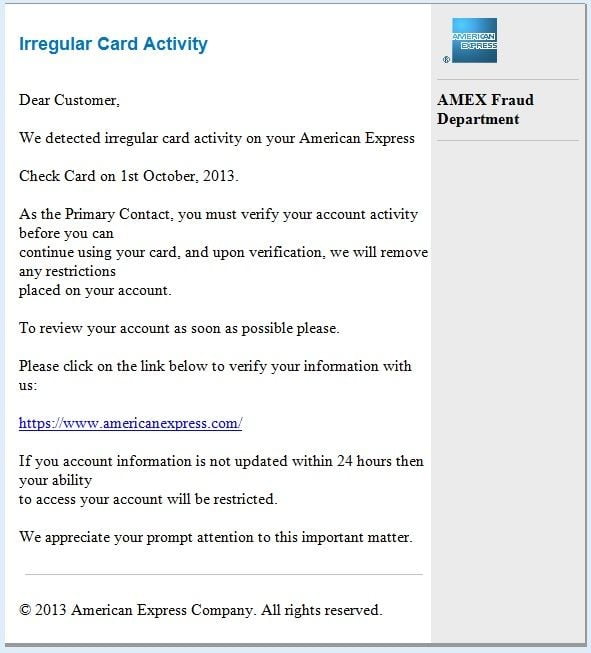
Over the past few weeks I’ve received a large percentage of phishing emails that purport to be from American Express, although they are not. These emails are sent by scammers trying to steal user names and passwords from unsuspecting American Express card holders, so they can then access their account information and card numbers to use them for fraudulent purposes. Below is a sample of one of the many phishing emails I received. Phishing attacks like this highlight how fragile trust can be in the inbox. When authentication and sender controls are misconfigured, even well-known brands can unintentionally expose recipients to unnecessary risk.

American

Although it is pretty obvious to me that this email is not from American Express and is no doubt a phishing email, there are some recipients who are not so astute. If your mother, grandfather or someone new to the Internet or not paying close attention received this email, would they be able to tell that it was not sent from American Express? Would they click the link that looks legitimate and appears as if it would take them to the American Express website? Even though it will not take them to the real American Express website, will they unwittingly type in their user name and password on the fake site? Obviously a percentage of people do, because if they didn’t, these phishing emails would cease being sent.

Below is the header that was received with this email:

From: American Express [mailto:fraud@aexp.com]
Sent: Tuesday, October 09, 2013 12:15 PM
To: redacted@emailanswers.com
Subject: Fraud Alert: Irregular Card Activity

Based on the received ‘from name’ and ‘email address’, it looks like the email was sent from American Express. It even has an aexp.com email address, which is the domain American Express uses to send emails from. It’s not that I blame American Express for sending this email, but rather American Express could easily stop this email from being delivered if they would simply fix their SPF Records. You might ask yourself at this point, how can you blame American Express if they didn’t send this email? Hang in there for 2 minutes and I’ll tell you. Let’s review a few details first.

OK, so what is an SPF Record?

An SPF (Sender Policy Framework) record is a DNS (Domain Name System) record which lists specific servers and IP addresses that are allowed to send e-mail from a domain, such as aexp.com. Correctly configured, this reduces spam and phishing activity that may be perceived to originate from a specific domain, that actually doesn’t, which is known as source address spoofing. For email marketers, this reinforces a broader lesson: technical controls and list hygiene work together. Even well-intentioned campaigns can create downstream risk when authentication, infrastructure, or recipient targeting are not handled responsibly.

An SPF record is used for messaging security purposes. The SPF record enables a receiving email server to query DNS and determine whether the sending server is authorized to send from a specific domain. There are three ways in which an SPF record can be parsed and dealt with; such as hard fail, soft fail or neutral. The difference between a hard fail and a soft fail is how the owner of SPF records expects the message recipients to treat a spoofed message. When a neutral response is received, it usually means that no SPF record exists for the domain. Most email servers will accept an email with a neutral SPF response, but most SMBs and large corporations all have published SPF records.

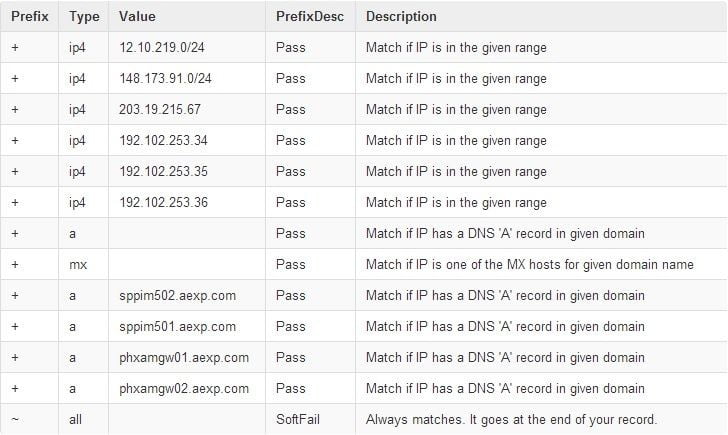
Below is a list of SPF Records for aexp.com, which is used by American Express to send email.

“Spf2.0/pra a:phxamgw01.aexp.com a:phxamgw02.aexp.com a:sppim501.aexp.com a:sppim502.aexp.com ~all”

“v=spf1 ip4:12.10.219.0/24 ip4:148.173.91.0/24 ip4:203.19.215.67 ip4:192.102.253.34 ip4:192.102.253.35 ip4:192.102.253.36 a mx a:sppim502.aexp.com a:sppim501.aexp.com a:phxamgw01.aexp.com a:phxamgw02.aexp.com ~all”

To simplify and make the records easier to decipher, I have broken down the formatted records into an easy to understand format.

dns

Without getting into too technical an explanation of how an SPF record is configured, I’ll discuss and point out the failure. If you look at the last line in the SPF record detail above, you’ll notice ~all which is listed as a “Soft Fail”.

Understanding the difference between ~all Soft Fail and -all Hard Fail

A Soft Fail (~all)

If the email message from a domain comes from an IP address which is outside the IP range that is defined in the SPF record for the domain, the message will be accepted but marked in the email header. This is something you do not see when you receive the email. All properly configured email servers will accept an email tagged with a “Soft Fail”.

A Hard Fail (-all)

If the email message from a domain comes from an IP address which is outside the IP range that is defined in the SPF record for the domain, the message will be rejected.

How American Express has failed to protect its card members.

If American Express simply changed their SPF Record from ~all (Soft Fail) to –all (Hard Fail) these fraudulent, phishing emails, that appear to be sent from American Express, would be rejected at the recipients email server and never get delivered to the intended email recipient. Simply using ~all is tantamount to saying, here are all the possible servers that our email should come from, but if it doesn’t accept it anyway. Why even bother publishing SPF records if you’re going to override them with a ~all?

American Express has a section on their website dedicated to fraud prevention and protecting your information. They provide advice and a vast amount of information to help you protect yourself, but fail miserably themselves where it really matters.

In 2012 alone, losses from credit card fraud totaled $6 billion. Now who do you think pay’s for those losses? You are correct, we all do. If by simply changing a tilde (~) to a dash () or ~all to -all (Soft Fail to Hard Fail) American Express could reduce the number of phishing emails delivered and significantly reduce credit card fraud and losses due to stolen credit card information. Why wouldn’t American Express make this simple change? Don’t know? Neither do I. Situations like this are a reminder that email risk is rarely caused by a single factor. Infrastructure configuration, sender reputation, and who you send to all influence how messages are received and trusted.

“It is the obvious which is so difficult to see most of the time. People say ‘It’s as plain as the nose on your face.’ But how much of the nose on your face can you see, unless someone holds a mirror up to you?”

― Isaac Asimov

December 2025 Update: (It only took them 12 years)

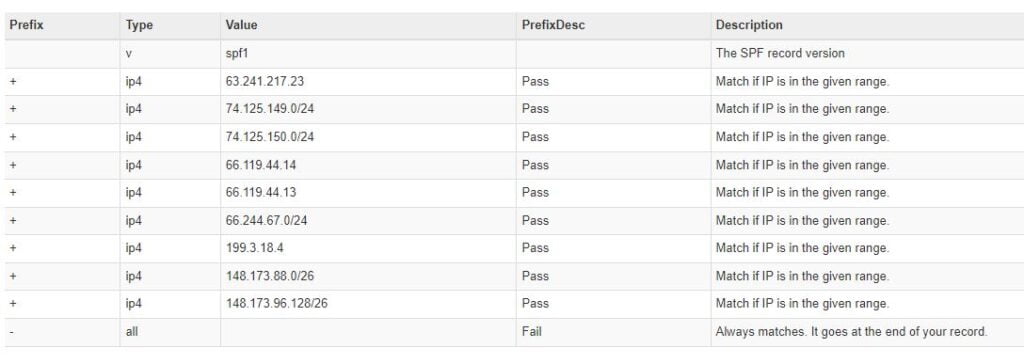
It appears American Express has fixed their SPF record and it only took them 10 years.

Amex SPF Fixed

This article is part of our broader resource on email list cleaning and hygiene, which explores how responsible sending practices reduce trust and security risks over time.

expensive bagel

On my way into work this morning I decided to stop and pick up bagels for the office and a cup of coffee for myself. As I pulled up to the bagel store, I noticed that I was 5 minutes early, because they hadn’t opened yet. So, I parked and got online behind the 3 people standing at the front door waiting for the store to open. I only waited about 10 minutes, but by the time they opened the doors, there must have been 20 people waiting in line behind me. Since there were only 2 people behind the counter, it seemed to be moving pretty slowly.

When it was my turn to order, the guy in line directly behind me leaned over my shoulder and asked the girl who was getting ready to help me if he could try the cinnamon raisin bagel. They had samples of each of the bagels cut up for customer to ‘try before they buy’ behind the counter. The counter girl politely asked the customer to wait his turn and asked me what I needed. Before I could give her my order, the guy behind me quickly interrupted me again and said he simply wanted to try a piece of the cinnamon raisin bagel. The girl behind the counter said she would be with him as soon as she finished with me. I attempted to try and give her my order again and once again, this annoying guy interrupted me and said, “Just give me a piece of that bagel to try”. At this point, I turned to him and explained that I was next and as soon as I get my order he could try as many different bagels as he would like. He looked at me with a blank, somewhat dumbfounded look on his face and went silent. While I thought that was it and began to place my order, you guessed it, he interrupted me again and in a pissed off tone said he wanted to just try a piece of that cinnamon raisin bagel.

As you can imagine, by this point I was getting twisted and somewhat aggravated at this clown, for his continual interruptions and I figured I better put an end to his ongoing obstruction in my attempt to get my bagels and the cup of coffee I came for, so I could make it to work without a pit stop at the police station for assault. Without taking another breath, I asked the girl behind the counter how much it would cost for all of the bagels they had. After a few seconds of her comprehending my question, she turned around, looked at the rack of bagels, turned back around and said, “I’m not sure…. Maybe $400”. I then said, “OK, I’ll take them all. Give me a black cup of coffee and bag up 2 dozen bagels for me. Then give everyone else in line, except this guy standing behind me, all of the bagels they want for free – my treat.”

As the ear-to-ear smile slowly appeared on the counter girls face and the guy behind me started bitching and saying “you can’t do that”, I simply turned to him and said, “Yes I can – and – I just did”. After I finally got my cup of coffee and bagels and walked out of the store, a few people in line behind me thanked me and the ‘cinnamon raisin, impatient, bagel taster guy’ stormed out bitching about something and mumbling under his breath.

expensive bagels

Patience is not simply the ability to wait – it’s how we behave while we’re waiting. Besides the moral of the story being, “Don’t be an interrupting asshole and wait your turn”, I started thinking about people being over-aggressive, not being patient and waiting their turn. Since I am involved in the email marketing space, this brought me to think about why companies are over-aggressive and send their email campaigns non-stop and how their overzealous campaign strategy can alienate their customers, piss people off and lead to unsubscribes. Calculating the correct number of deployments per month takes time to figure out.

Don’t Annoy your Customer with your Email Marketing Strategy

Most people think the more they send to their email list, the better chances they have of converting a new lead or sale. In actuality, the more you send, the more your engagement per campaign goes down. If you over send to your email list, besides the reduction in engagement, you’ll also have to consider that your subscribers might think you’re spamming them, and exit your list very quickly. There is no magic number when it comes to the frequency of email campaigns or newsletters you send to your customers on a weekly or monthly basis. Be sure to send them relevant information and don’t simply send, just to send. Keep your subscribers loyal and don’t give them a reason to opt-out. Make your message relevant and to the point. Find what feels to be a comfortable middle ground and send relevant information and tweak the frequency based on campaign engagement.

We find that sending to our customers and newsletter recipients twice per month is the sweet spot for us, although this is not set in stone. If we have more to share, we’ll send more often and if we have less to share… well, you get the idea.

Update:
So, for Shawn (last name omitted on purpose) from Newsweek and the 2 other emails I received questioning the validity of the events in the bagel store, I’ve posted the receipt below.

Bagel receipt 1
dating customers 1

Imagine walking into a bar and immediately proposing to the first person that catches your eye. Unless you have the body of David Beckham or the lips of Angelina Jolie, I am going to go out on a limb here and say that your approach to finding a life-long partner is a bit skewed. And I bet you would agree with me. As we all know, dating can be extremely exhausting. It’s a large investment of time, money, and emotions in your search for “the one” that makes it all worthwhile in the end. What it all boils down to is that the world of dating and the world of marketing are one in the same. I am not suggesting that you pursue romantic relationships with your most valued customers, as that could lead to sexual harassment charges that could do more damage to your business reputation than it’s worth. What I am suggesting is that you should align your approach to dating with your approach to marketing.

The problem with marketers today is that we go straight for the gold. We are attempting to go fishing without bait. We tend to interrupt customers and try to sell them our products and services without realizing that, without offering some kind of incentive to spark the conversation, they have no reason to pay attention to you. This is essentially equivalent to proposing marriage before asking them on a second date.

Think about applying for a job, for instance. It’s a process. You can’t submit your resume on every job search website and expect to get hired on the spot. A well-crafted resume will earn you an introductory interview. Given that you are well-spoken and present yourself in a professional manner, you may get the opportunity to come in for a second or third interview. Once proper measures are taken to determine whether or not you are a right fit for the company, only then should you expect an offer. After paying hefty fees toward your schooling and investing your time in an effort to gain relevant work experience, you are now armed with the knowledge and expertise to enter into another line of work and eventually reap the rewards of your initial investment.

The same goes with marketing in that the customer acquisition costs far outweigh the customer retention costs. Take American Express, for example. This credit card company invests nearly $150.00 to get a new cardholder. Although this makes you wonder how they are still in business, it’s because they have adopted the permission-based marketing model to generate loyal customers who stick with them for the long term. Instead of approaching new customers with the intention of making a sale right off the bat, they woo their customers with an offer that they can’t resist. They focus their media efforts to sell their permission to engage in conversation, and have earned much higher response rates as a result. While $150.00 seems a bit steep at first glance, American Express leverages that expense by engaging in a continued, mutually beneficial relationship with their customers. Rather than exhausting their resources into selling their product pipeline to as many new customers as they can find, they extract the maximum value from each of their loyal customers.

But how do you initially open the lines of communication with those who want to hear from you? In this information age where owning a computer or smartphone is just as common as owning a toothbrush, we can target and reach business decision makers or consumers in around the globe through email marketing for a fraction of the cost of more traditional forms of advertising. As advances in technology have enabled us to track consumer interest and buying patterns online, we have the ability to choose who to target. As long as you provide something of value and demonstrate how it will enhance the lives of your audience, those who are interested in your offer will come to you for more information.

In addition, smart marketers acknowledge the fact that marketing does not end with the first sale. Rather, that’s where true marketing begins. Now, the question lies in finding the secret to keep our customers satisfied and wanting more. Not to keep referencing the dating analogy, but try to spice things up every now and then. Eventually, we all get sick of going for dinner and a movie.

Successful business lies in continually fine-tuning the products and services you offer while also expanding your selection to meet the ever-changing wants and needs of your client base. It means revamping your advertising strategy and adjusting your incentives to continually lure them in.

The bottom line? Sell more to fewer customers.